Draw a seating chart

Build an interactive seating map with seats, rows, sections and categories — on your own in the online builder, or order a ready-made chart turnkey.

What a seating chart is and why draw one

A seating chart (seating map) is an interactive venue plan that shows every seat: rows, sections, stalls, balcony, boxes, zones and tables. The buyer picks a specific seat on the map, while the organizer manages prices and categories.

In Evenda you can draw a seating chart online in a visual editor in minutes — no designers or complex software. Lay out rows and seats, add categories, publish the event and sell tickets with assigned seats.

An example of our charts from the catalog

This is what a finished interactive seating chart looks like on an event page. Pan and zoom — exactly the way buyers will see it.

Loading the interactive seat map…
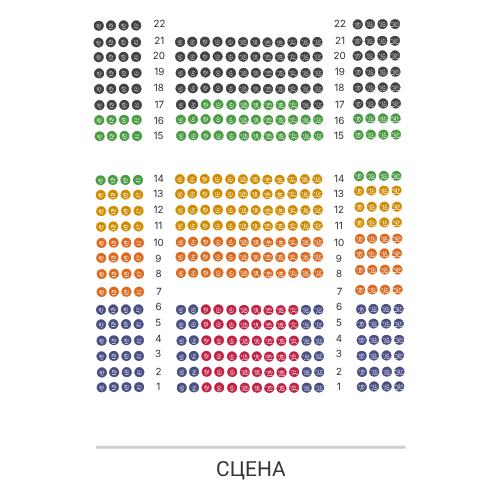
Drag to pan and scroll to zoom the seat map.

Open the “Sava Centar - Plava dvorana” chart

What seating charts you can draw

The builder fits any venue — from a small hall to a stadium.

Theatre and concert hall: stalls, amphitheatre, balcony, boxes and dress circle.
Stadium and arena: stands and sectors with a large number of seats.
Cinema and lecture hall: even rows of numbered seats.
Conference hall and forum: sections, floors and zones for different tiers.
Banquet and gala dinner: tables with seats and free seating.
Fan zone and standing room: capacity zones without numbering.

How to draw a seating chart in 4 steps

1

Create a chart

Open the builder in the organizer dashboard and pick a chart type: simple, with sections and floors, or with zones.

2

Lay out the seats

Add rows and seats, sections, tables and standing zones. Change numbering and the venue shape by dragging.

3

Set categories

Split seats into categories (stalls, balcony, VIP) — ticket prices are based on them.

4

Publish and sell

Attach the chart to an event and sell tickets with seat selection — with no commission on sales.

Seating chart editor features

Visual builder

Draw the chart with your mouse: rows, seats, sections and tables are added in a couple of clicks.

Sections, floors and zones

Support for complex venues with multiple tiers, sectors and capacity zones.

Categories and prices

Group seats into categories and assign them different prices for each event.

Interactive seat selection

Buyers pick seats right on the chart, on any device.

Two ways to get a seating chart

Draw the chart yourself or leave it to us.

Free

Draw it yourself

A free online builder in the organizer dashboard. Full control over rows, seats and categories.

Open the builder
$50

Order a chart

Send us an image or a venue plan — we will draw the electronic seating map for you. The price is $50.

Usually ready in 1–2 days, up to 5 business days at most.

Order a chart

Frequently asked questions

How do I draw a seating chart online?

Sign up for Evenda, open the “Seating charts” section and create a new chart in the visual editor: add rows, seats, sections and categories. It is free.

How much does it cost to draw a seating chart?

Doing it yourself in the builder is free. If you need a ready-made chart turnkey, we will create it on request for $50.

Can I make a chart with complex seating?

Yes. Simple charts, charts with sections and floors, and charts with capacity zones are supported — for theatres, arenas, conference halls and banquets.

What do I need to order a chart?

The venue name and address and a clear image or plan with visible seats. After payment the request enters the queue and is usually processed in 1–2 days.

How do buyers pick seats?

The event page shows an interactive chart — the buyer picks a specific seat, and it is automatically held during payment.