Daiz goengq lingz yawq.

Create an interactive seating plan with seats, rows, sections and categories — do it yourself in an online constructor, or order a ready-made turnkey plan.

What is the hall scheme and why draw it

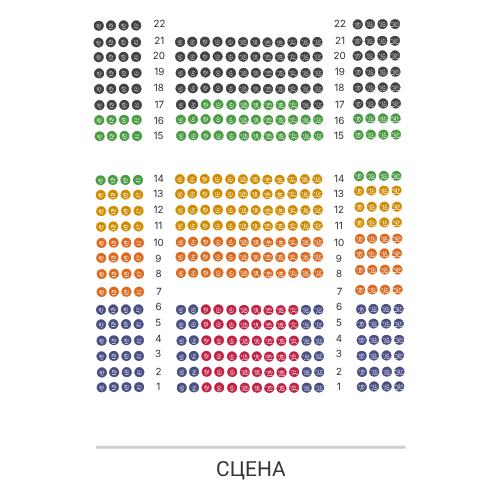
Hall scheme (seating plan) — this is an interactive floor plan of the venue, where you can see every seat: rows, sections, blocks, balcony, boxes, zones and tables. The buyer selects a specific seat on the diagram, and the organizer manages prices and categories.

In Evenda, the hall layout can be drawn online in a visual editor in just a few minutes — without designers and complex programs. Arrange rows and seats, add categories, publish the event and sell tickets with seating information.

Kataloğumuzdaki şemalarımızın bir örneği

Neix dwg gwnz caeuq goengq interactive seiq haenh raemz gwnz rog. Gyaiq yawj—roengz neix yawj boux.

Loading the interactive hall map…
Hudula ishadi usebenzisa igundane, bese ukhulisa ngewheel ukuze ubuke indawo.

Open the diagram «Sava Centar - Plava dvorana»

What hall schemes can be drawn

Constructor is suitable for any venue — from a small hall to a stadium.

Theatre and concert hall: parterre, amphitheatre, balcony, boxes and foyers.
Stadium and arena: stands and sectors with a large number of seats.
Cinema and lecture hall: even rows of numbered seats.
Conference hall: sections, floors and zones for different tariffs.
Banquet and gala dinner: tables with seats and free seating.
Fan zone and standing places: zones of capacity without numbering.

How to draw a hall scheme in 4 steps

1

Create the scheme

Open the constructor in the organizer's cabinet and choose the type of scheme: simple, with sections and floors or with zones.

2

Place the rows and seats

Add rows and seats, sections, places and standing zones. Adjust numbering and the shape of the hall by dragging.

3

Set categories

Divide seats into categories (parterre, balcony, VIP) — ticket prices are built on these.

4

Banquet and gala dinner: tables with seats and free seating.

Publish and sell

Diagramredakteur se eienskappe

Visual designer

Dauz goengq daemx: raenq, ndaw, gyangh caeuq boux gwn haenq gij klik.

Sekcii, etazhi i zony

对具有多个层次、扇区和容量区域的复杂场地的支持。

Faenh goj caeu cienj

Group locations into categories and assign them different prices for each event.

Interactive location selection

Покупатели выбирают места прямо на схеме на любом устройстве.

Izindlela ezimbili zokuthola uhlelo lwesiholo.

Caeuq goengq goek daengq gwn, yawj roengz raeuj haen.

mwnz

Dweba wena uqobo

Free online constructor in the organizer's cabinet. Full control over rows, seats, and categories.

Otevřít konstruktor
$50

Gouj goj faenh

Faenq haeuj nyenj gij doengh yiengh lauz — raeuj gaij daengz gwnz hanz cingq goengq haenq. Gyvuz — $50.

Obično spremno za 1-2 dana, maksimalno do 5 radnih dana.

Заказать схему

Frequently asked questions

How to draw a hall layout online?

Register in Evenda, open the 'Hall layouts' section and create a new layout in the visual editor: add rows, seats, sections, and categories. This is free.

How much does it cost to draw a hall layout?

Do it yourself in the constructor — free. If you need a turnkey ready-made layout, we will create it on your request for $50.

Is it possible to create a layout with a complex seating arrangement?

Simple diagrams, diagrams with sections and levels, as well as layouts with capacity zones - for theatres, arenas, conference halls and banquets.

What is needed to order a layout?

The name and address of the hall and a clear image or plan with visible seating. After payment, the request enters the queue and is processed in 1-2 days.

How do buyers choose seats?

On the event page an interactive diagram is shown - the buyer selects a specific seat, and it is automatically reserved for the duration of the payment.